
Nodes
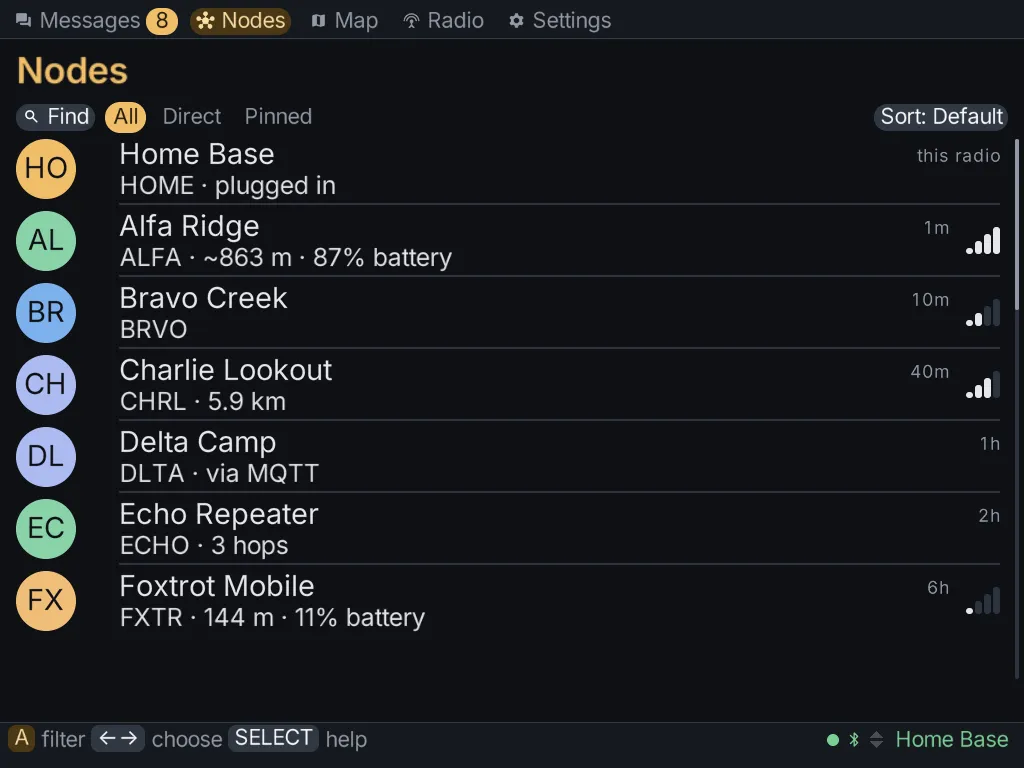
The Nodes tab lists every node your radio has heard. It’s the mesh’s contact list.
The list outlives the connection. When your radio disconnects, the nodes stay listed, and a reset of the radio’s node database doesn’t clear them either. To clear them, see Node lists.
Finding a node
Section titled “Finding a node”A row of chips sits above the list. Left / Right move between them and A presses one.
| Chip | What it does |
|---|---|
| Find | type part of a name, short name or !id; the list keeps only matching nodes. X clears it |
| All | every node |
| Direct | nodes your radio hears directly, in earshot |
| Pinned | only the nodes you pinned |
| Sort | choose an order: default, recent, name, distance or hops |
To pin a node so it stays at the top, press X on it in the list.
A node’s details
Section titled “A node’s details”Press A on a node to open its details. A row only appears when the node has actually reported that information. A node that has never sent its position has no distance row, for example.
The details can include the node’s name and ID, when it was last heard, its signal, how many hops away it is, its position, battery and telemetry, and whether its key is verified.
What you can do with a node
Section titled “What you can do with a node”The node’s actions include:
- Message this node, to start a direct conversation.
- Ask for its name, Ask where it is or Ask for telemetry, to get fresh information.
- Trace route, to see the path your messages take to it.
- Show on map, if it has a position.
- Pinned to top, Mute this node or Ignore this node.
- Remove from radio, pressed twice, to remove it from the radio’s node database.
- Verify this key. See Verifying a key.
- Configure by radio, to change the node’s settings over the mesh. This only works for a node that has given your radio admin access.
Some actions only appear for MeshCore radios, such as logging in to a repeater. See MeshCore radios.
Verifying a key
Section titled “Verifying a key”Direct messages on Meshtastic are encrypted with each radio’s key. Verifying a key proves the node you’re messaging is the person you think it is, not someone else using their name.
You do the check together, out loud, never over the mesh:
- Choose Verify this key on the node.
- One of you is shown six digits. Read them to the other person, who types them in.
- You are both shown a short code. Compare them. Answer They match only if every character matches.
- Choose Mark it verified.
A verified node shows verified in person and a padlock.