
Messages
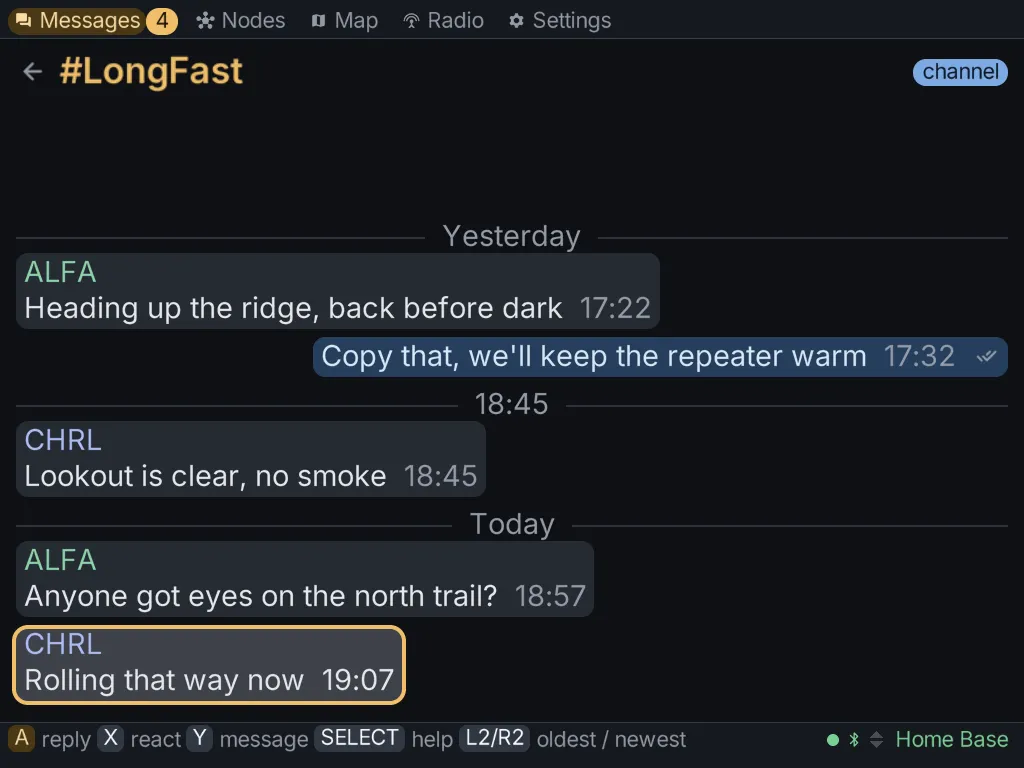
The Messages tab has two levels: a list of conversations, and the conversation you open.
The conversation list
Section titled “The conversation list”- All traffic: every message from every channel and node, in one transcript.
- Each channel on your radio, such as the primary channel and any secondary channels.
- Each node you have direct messages with.
- New message, where you pick a channel or a node to write to.
Reading a conversation
Section titled “Reading a conversation”Open a conversation with A. Inside it:
- A replies to the message under the cursor.
- X reacts to it with an emoji.
- Y writes a new message to the conversation.
- START resends one of your messages that failed. The failed message stays where it is, and the retry goes out as a new message.
A direct message you send shows its state: sending, then delivered once the other radio acknowledges it, or failed.
Messages are kept on the SD card, one file per conversation. A conversation can go back further than what the radio itself holds, and it survives a restart.
Writing a message
Section titled “Writing a message”Press Y to open the compose sheet. It sits on top of the conversation, so it always knows who the message is for. It has:
- the draft: press A to type with the keyboard, and START to send;
- quick replies, one row down: canned messages you can send with one press.
Your own quick replies
Section titled “Your own quick replies”In the compose sheet, press X on the draft row to keep the current draft as a quick reply. You can keep up to 16 replies, each up to 63 bytes.
Quick replies are saved to canned.txt in the client’s data folder (~/.meshclient/). You can
also edit that file directly, one reply per line.
Deleting a conversation
Section titled “Deleting a conversation”On the conversation list, press X once to arm the delete and again to confirm. The messages are removed from this client: from its memory and from the file on the card. Nothing is deleted from the radio, because the radio keeps no history of its own for the client.
- Deleting a channel conversation empties it, but the channel stays in the list.
- Deleting a direct conversation removes it from the list.